
Lift & pumping stations
Keep wet-well level and pump activity together when investigating rising levels, unusual runs or uneven workload.
- Level
- Pump state
- Starts & runtime

WATER & WASTEWATER OPERATIONS
See pressure, level and pump behavior in context. Follow a change from the network to the equipment—and know where to look next.
Built around the questions operators actually ask.

Visibility that leads somewhere.
THE BASINPILOT EXPERIENCE
Start wide. Get specific. Connect the reading to the equipment and the evidence behind it.
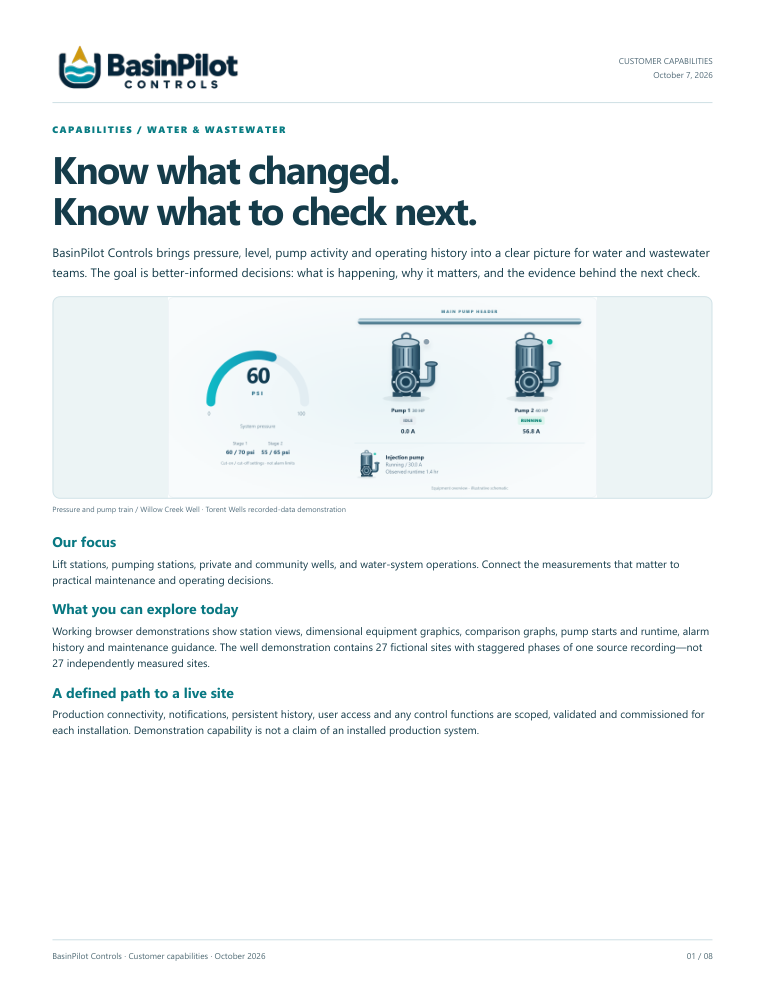
Pressure, pump status and current in one view. See how the equipment is behaving before deciding what deserves a closer look.
Scan pressure and pump activity across the demonstration network, then open a well to investigate its equipment and history.
Review pressure cycles against the control settings. Compare the pump activity and operating conditions before drawing a conclusion.
These are actual screens from the working demonstration, using recorded data. Torent Wells presents 27 fictional sites with staggered playback from one recording. No equipment commands are sent.
DIFFERENT SYSTEMS. THE SAME NEED FOR CLARITY.
Your system has its own operating story. Put the right signals together to understand it.
Keep wet-well level and pump activity together when investigating rising levels, unusual runs or uneven workload.

See pressure recovery, pump current and run history in context—from a network overview to an individual well.
MAINTENANCE WITH A REASON BEHIND IT
Useful guidance explains what changed, why it matters and what to check next—with the graph behind each finding.
See the operating evidenceOBSERVE
Compare run duration with a relevant operating baseline.
PUT IT IN CONTEXT
Follow pressure recovery, current and demand conditions on the same timeline.
FOCUS THE NEXT CHECK
Check demand, supply, sensors and equipment condition. Verify the result of authorized work.
A pattern supports investigation. It is not, by itself, a confirmed fault or a failure prediction.
A PRACTICAL PATH TO YOUR FIRST STATION
Begin with existing controls, a useful question and a verified set of signals. Define the next step together.
Proposed connection approach. Interfaces, persistent history, access, recovery and notifications are defined and validated per project. Local controls retain equipment protections.
Bring a recurring concern, controller details and an example export. Agree what your team needs to understand.
Confirm point identity, units, timestamps and quality. Set the read-only scope and acceptance criteria.
Work through findings with operators and service personnel. Add sites and integrations from demonstrated needs.
TAKE A CLOSER LOOK
Eight pages on station visibility, maintenance review, integration and the first engagement.
Read the capabilities PDFQUESTIONS, ANSWERED
Not necessarily. Discovery checks approved interfaces, available points and any required hardware or licensing. Compatibility is verified for your installation.
No. Both dashboards use recorded data at an accelerated playback speed. Torent Wells uses fictional site names and staggered playback from one recording. History accumulates while the page is open; it is not a persistent production historian.
Operating patterns can focus an inspection. Run duration, starts, current and pressure recovery do not, on their own, establish a failure cause or remaining equipment life.
The demonstrations are read-only and send no equipment commands. Any production control work is a separate, approved and tested scope with defined limits, operator override and fallback.
Work-order intake, invoice intake and persistent contractor or employee service records are not included in the current demonstrations. We can discuss those requirements as a separate integration scope.
A production scope must distinguish fresh, stale and unavailable data, preserve timestamps and test the agreed recovery behavior. Those functions are defined and commissioned for your site.
LET’S MAKE IT SPECIFIC
One recurring question. Your existing controls.
A clearer path to the next decision.
Tell our Sales Team what your operators need to understand. We’ll use that to define a useful first conversation.
Discuss your first stationOpens your email app · mike@procontroltechnologies.com